
How to Create a Free Email Signup Page That Turns Visitors Into Subscribers
You don't need an expensive website, advanced design skills, or a large marketing budget to start building an email list. In fact, one of the most important tools you need is a simple page that gives people a compelling reason to subscribe.
However, there's a difference between creating an email signup page and creating one that people actually want to sign up through. Even an attractive page can struggle to attract subscribers if the offer is unclear or the signup process is unnecessarily complicated.
Learning how to create a free email signup page involves more than choosing a template and adding an email form. You also need to understand your audience, communicate the value of your offer, and connect everything to an email marketing system.
Whether you're an affiliate marketer, online entrepreneur, or someone building an email list for the first time, this guide will walk you through the entire process without requiring an upfront investment in software.
What Is an Email Signup Page and How Does It Work?
Understanding the Purpose of an Email Signup Page
An email signup page is a dedicated webpage designed to encourage visitors to join your email list. You may also hear it referred to as a squeeze page, opt-in page, or lead capture page.
Unlike a traditional website, which might contain articles, navigation menus, and multiple offers, a signup page typically focuses on one action: subscribing.
In exchange for their email address, visitors might receive a free report, educational newsletter, downloadable checklist, or another resource that interests them.
The key is giving people a meaningful reason to subscribe rather than simply asking them to join your mailing list.
How a Signup Page Fits Into Your Email Marketing Funnel
Your signup page is the entry point into a broader email marketing process.
A basic email marketing funnel works like this:
- A visitor arrives at your signup page.
- They enter their email address and submit the form.
- Their information is added to your email list, subject to any confirmation requirements.
- They reach a thank-you page or receive further instructions.
- Your email marketing system delivers the promised resource and begins the appropriate follow-up communication.
An autoresponder can automate much of this process, allowing you to welcome subscribers even when you're away from your computer.
Your signup page attracts the subscriber, while your follow-up emails help develop the relationship.
Why You Don't Need a Website to Start Collecting Subscribers
Many email marketing platforms provide hosted landing pages. These pages have their own shareable web addresses, allowing you to promote them without purchasing a domain or building a separate website.
You can share your signup page through relevant online communities, social profiles, educational content, and other appropriate marketing channels.
A website may become beneficial as your business develops, but it doesn't have to be your first investment.

Choosing the Right Free Email Signup Page Builder
What to Look for in a Free Signup Page Builder
Before choosing a platform, think about what you need rather than which software has the longest feature list.
A suitable signup page builder should allow you to:
- Create and publish a hosted signup page.
- Customize headlines, text, colors, and forms.
- Display your page correctly on mobile devices.
- Collect and manage email subscribers.
- Deliver a welcome email or promised resource.
- Monitor basic signup activity.
Having your page builder and email marketing system within the same platform can also simplify the setup process, particularly when you're just getting started.
Free Email Signup Page Builders Worth Exploring
Several platforms offer free options for creating signup pages and building an email list.
| Platform | Free Plan Features | Important Consideration |
|---|---|---|
| LeadsLeap | 10 hosted pages, 10 email lists, and unlimited subscribers | Automated follow-up sequences require Pro membership. |
| Systeme.io | Funnel building, email marketing, and contact management | Free accounts have usage limits on certain features. |
| MailerLite | One published landing page, 250 active subscribers, and 2,500 monthly emails | Growing lists may eventually require an upgrade. |
| Kit | Unlimited landing pages and forms, with up to 10,000 subscribers | Advanced automation requires a paid plan. |
According to its official membership information, LeadsLeap combines a page builder with its SendSteed email list management system. Free members can automatically deliver a welcome email and send up to 10 broadcasts monthly.
Systeme.io combines funnel creation and email marketing, while MailerLite and Kit offer alternatives for marketers who want to focus primarily on subscriber collection and email communication.
Understanding the Limitations of Free Plans
Free doesn't necessarily mean unlimited.
Before committing to a platform, check its subscriber allowances, email sending limits, automation features, branding restrictions, and custom domain options.
Also, distinguish between an ongoing free membership and a temporary free trial.
You don't want to spend several days building a funnel only to discover that you need a paid subscription to keep using essential features.
Choose a platform that meets your immediate needs, with the flexibility to expand when your business genuinely requires it.
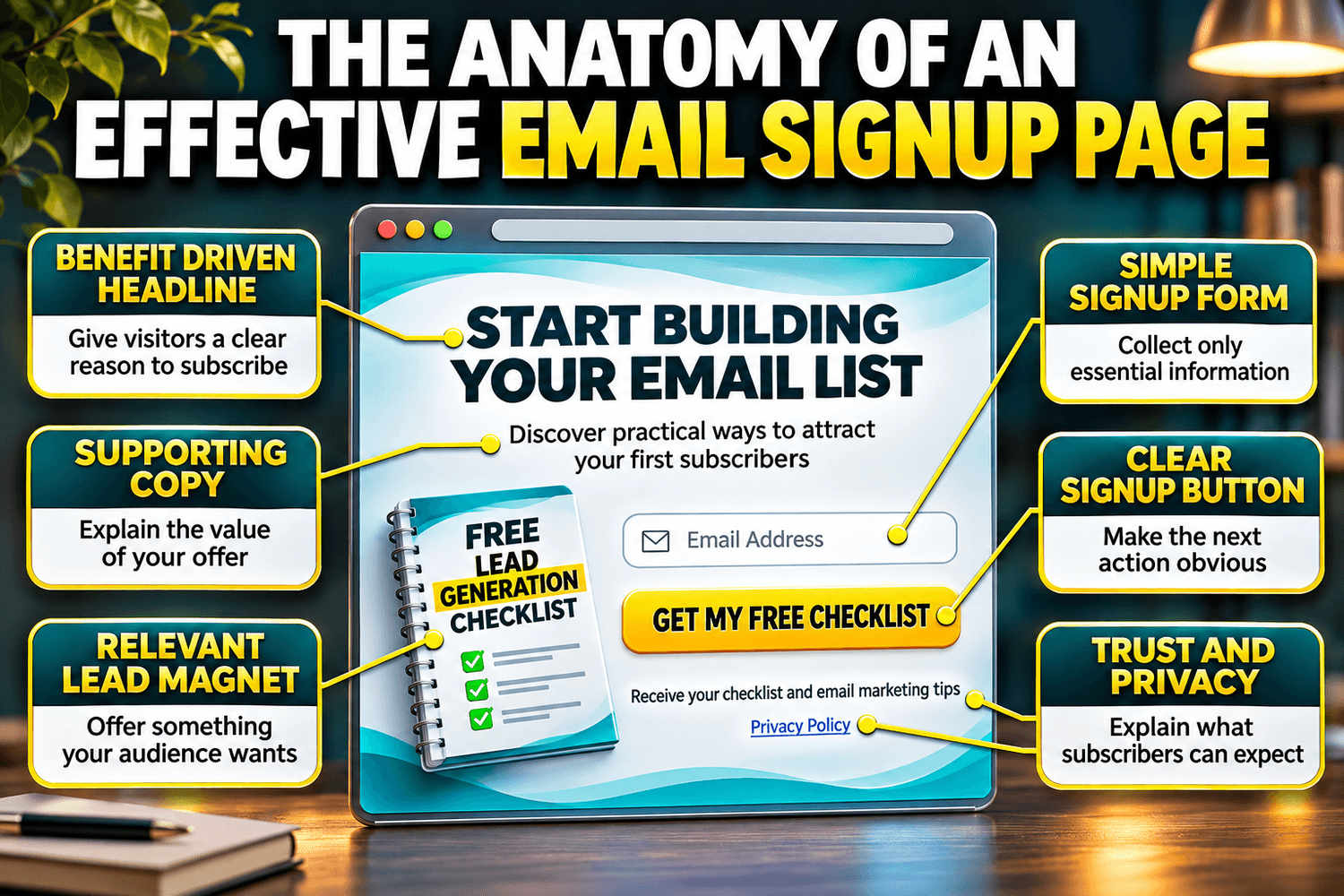
The Essential Elements of an Email Signup Page That Converts
Write a Headline That Gives Visitors a Reason to Stay
Your headline should immediately communicate what visitors can expect to receive and why it might interest them.
Compare these two headlines:
Subscribe to My Email List
Discover 7 Simple Ways to Start Building an Email List Without Paid Advertising
The first headline describes an action. The second communicates a potential benefit and addresses a recognizable problem.
When writing your headline, consider what your audience wants to accomplish, what challenges they're experiencing, and how your resource can help.
Keep the message clear enough that visitors don't have to read several paragraphs to understand your offer.
Offer a Lead Magnet People Actually Want
A lead magnet is a resource offered in exchange for joining an email list.
Popular examples include:
- Free educational reports.
- Step-by-step beginner guides.
- Printable checklists.
- Copy-and-paste templates.
- Resource lists and tool recommendations.
- Short email courses.
Your lead magnet doesn't need to be a lengthy ebook or an expensive product.
A two-page checklist that solves a specific problem could be more useful to your audience than a lengthy report covering dozens of unrelated topics.
Focus on helping subscribers accomplish something meaningful. If your audience struggles with generating leads, for example, a practical guide explaining several free lead generation methods may be a relevant starting point.
Keep Your Signup Form Simple and Focused
Every additional decision you ask visitors to make can introduce unnecessary friction.
For a basic email signup page, an email address may be all you need. You can include a first-name field if personalization is important to your email marketing strategy.
Your signup button should also communicate the action clearly. Instead of using a generic button labeled "Submit," consider wording such as:
- Get My Free Guide
- Send Me the Checklist
- Join the Newsletter
Use readable typography, sufficient contrast, and enough space around important elements.
Avoid filling your signup page with unrelated offers, excessive navigation links, and distracting animations.
Build Trust Before Asking for an Email Address
Visitors are more likely to feel comfortable sharing their information when they understand who they're subscribing to and what they can expect.
Briefly explain whether they'll receive a downloadable resource, regular educational emails, promotional recommendations, or a combination of these.
Include appropriate privacy information and make it easy for subscribers to unsubscribe from future marketing emails.
Most importantly, make sure your promotional claims accurately reflect what you're offering.
Exaggerated income promises or unrealistic results may attract attention, but they can undermine trust and create expectations your content cannot fulfill.
Consent and privacy requirements vary by jurisdiction, so make sure your signup process complies with the rules applicable to your audience.
How to Create a Free Email Signup Page Step by Step
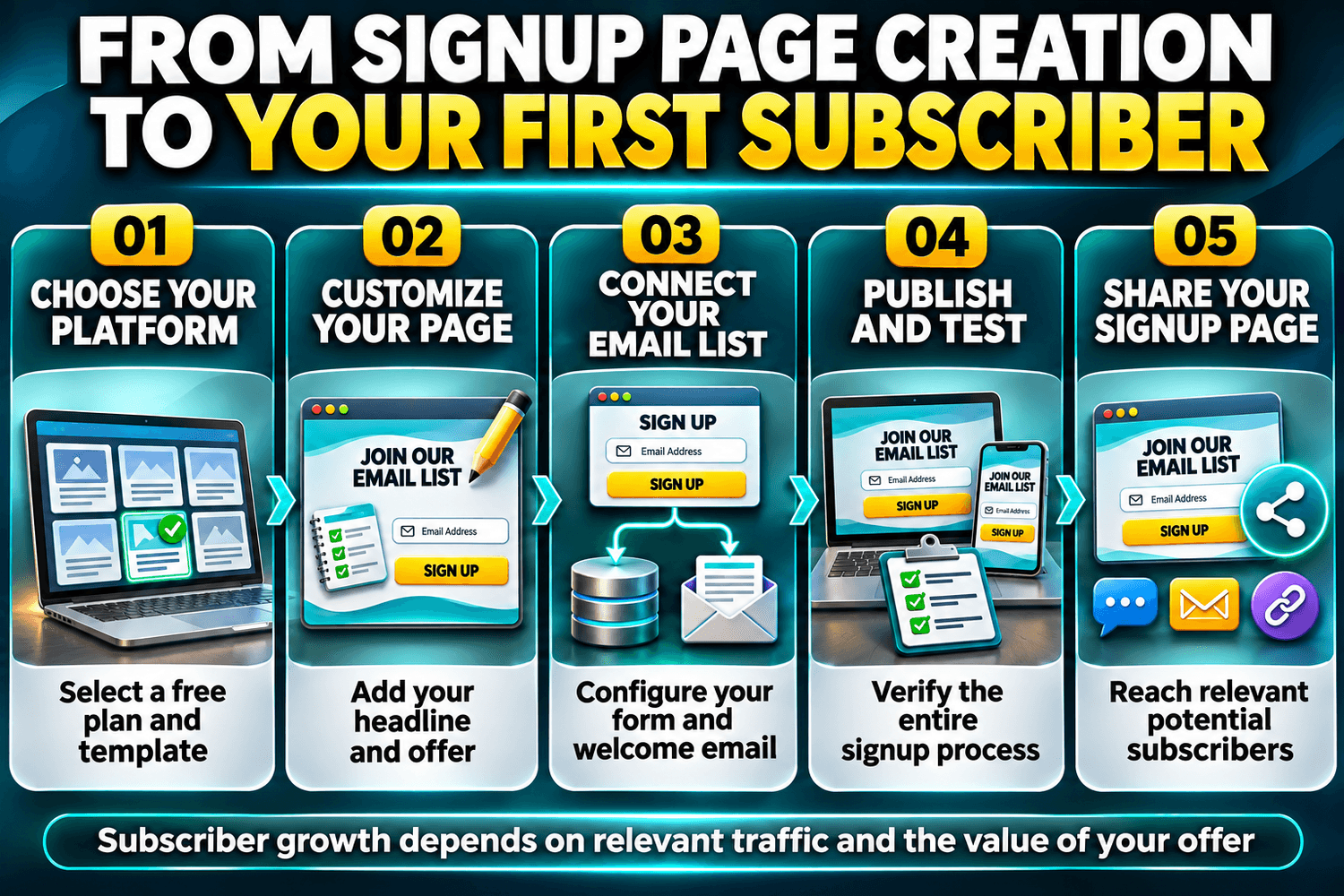
Create Your Free Account and Choose a Page Template
Start by selecting a platform that provides both the page-building and email collection features you need.
Once you've created your account, look for its landing page, funnel, or page builder section.
Most beginners will benefit from choosing a straightforward template designed around a single subscription offer.
Look for a layout with space for a prominent headline, a short explanation, a signup form, and a clear subscription button.
You can always customize the design later. Your immediate objective is to create something functional and easy to understand.
Customize Your Headline, Offer, and Page Design
Replace the template's demonstration content with messaging relevant to your audience.
A simple signup page structure might include:
| Page Element | Example |
|---|---|
| Headline | Start Building Your Email List Without Paid Advertising |
| Supporting Text | Learn practical methods for attracting your first subscribers. |
| Lead Magnet | A free beginner's lead generation checklist |
| Signup Form | Email address |
| Button | Get My Free Checklist |
| Subscription Notice | Receive the checklist and occasional email marketing tips. |
This example communicates the audience benefit, explains the resource, and makes the subscription process understandable.
Add a relevant image if it improves the presentation, but don't allow decorative elements to distract from the offer.
Check how the page looks on a smartphone. Make sure the headline remains readable, the form fits within the screen, and the signup button is easy to tap.
Connect Your Signup Form to an Autoresponder
Your signup page needs somewhere to store the email addresses visitors submit.
Create a subscriber list or group within your chosen email marketing platform, then connect your signup form to that list.
For example, LeadsLeap's Page Builder supports connecting forms directly to SendSteed or using a compatible external email list management service.
Next, prepare your welcome email.
A useful welcome email should thank the subscriber, deliver the promised resource, briefly introduce your content, and explain what they can expect from future emails.
If your platform uses double opt-in, configure the confirmation process and ensure subscribers know they must confirm their email address before receiving further communication.
Remember that automatic welcome emails and extended automated email sequences are different features. Check which ones your free plan supports.
Publish and Test Your Email Signup Page
Once you've completed the design and connected your email list, publish the page using the hosted URL provided by your platform.
Don't start promoting it immediately. First, experience the entire signup process as a visitor.
Use this testing checklist:
- Open the public signup page in a private browser window.
- Check its appearance on desktop and mobile.
- Submit a test email address.
- Check that the appropriate thank-you page or message appears.
- Complete email confirmation if required.
- Verify that the subscriber appears in the correct list.
- Check whether the welcome email arrives.
- Open the promised report, guide, or download.
- Test relevant links and unsubscribe functionality.
If anything fails, correct the problem and repeat the test.
A professional-looking signup page isn't particularly useful if visitors cannot complete their subscription or receive the resource they were promised.
A Practical Email Signup Page Example and Why Its Elements Matter
Identify a Problem Your Target Audience Wants to Solve
One of my own email signup pages focuses on helping people who are struggling to make money online.
The opening headline asks a direct question:
Struggling to Make Money Online?
This approach immediately identifies the intended audience and addresses a frustration many beginners experience.
Rather than opening with the name of a product or discussing complicated marketing strategies, the headline starts with a problem the visitor may recognize.
You can apply the same principle to almost any niche.
An email marketer might address difficulties attracting subscribers, while a fitness coach might focus on helping busy people establish a manageable exercise routine.
Connect Your Free Report to a Specific Reader Benefit
My signup page offers a free report focused on generating leads through a copy-and-paste approach.
The educational principle behind this offer is to connect an existing audience problem with a practical resource.
When developing your own free report, think about what someone should understand or be able to attempt after reading it.
You don't need to promise extraordinary results. A resource that helps readers take their first meaningful step can provide genuine value.
Evaluate the Signup Page From a Visitor's Perspective
Imagine arriving at your signup page for the first time without knowing anything about your business.
Ask yourself:
- Can I immediately understand what this page offers?
- Is the resource relevant to my interests?
- Does the messaging sound credible?
- Do I know what happens after subscribing?
- Is the signup process straightforward?
Looking at your page from this perspective can help you identify weaknesses you might otherwise overlook.
Remember that the purpose of an effective signup page is to communicate value clearly, not simply to make the biggest promise.
Common Email Signup Page Mistakes and How to Avoid Them
Asking for Too Much Information Too Soon
Requesting a visitor's full name, telephone number, location, and other personal details may be unnecessary when delivering a simple free report.
Collect only the information you genuinely need.
You can learn more about your subscribers as your relationship develops rather than attempting to gather everything during their first interaction.
Offering a Lead Magnet That Doesn't Match Your Audience
Attracting subscribers with an unrelated free resource can create problems later.
For example, offering a general motivational ebook to attract people interested in email marketing may result in subscribers who have little interest in your future emails.
Your signup page, lead magnet, and email content should work together.
Neglecting Mobile Testing and Subscriber Follow-Up
It's easy to spend hours designing a signup page on a computer without checking how it appears on a smartphone.
Similarly, collecting an email address accomplishes little if the subscriber never receives the promised resource.
Here are several common problems and practical ways to address them:
| Common Mistake | Practical Solution |
|---|---|
| Unclear headlines | Communicate one specific benefit. |
| Excessive form fields | Collect only essential information. |
| Unrelated lead magnets | Match your resource to audience interests. |
| Poor mobile presentation | Test your page on different screen sizes. |
| Missing welcome emails | Configure and test resource delivery. |
| Exaggerated claims | Use credible, transparent messaging. |
Address these fundamentals before investing time in more advanced optimization techniques.
What to Do After Publishing Your Free Email Signup Page
Start Sharing Your Signup Page With the Right Audience
Publishing your signup page doesn't automatically bring visitors to it.
Begin sharing your page through relevant educational articles, social media profiles, appropriate online communities, and other organic marketing channels.
Focus on reaching people who are genuinely interested in your free resource rather than simply trying to attract as much traffic as possible.
If you're starting without an established following, learning how to grow an email list with no audience is a useful next step.
Track Subscriber Activity and Improve Your Page Over Time
Where your marketing platform provides tracking, monitor how many people visit your page and how many complete the signup process.
You can calculate your signup conversion rate by dividing completed signups by page visits and multiplying the result by 100.
For example, 20 completed signups from 200 visits would produce a 10% conversion rate. This is an illustrative calculation, not an expected performance benchmark.
When making improvements, try changing one significant element at a time. This could be your headline, lead magnet description, or signup button wording.
Avoid drawing strong conclusions from very small amounts of traffic.
Build Relationships With Your New Email Subscribers
Getting someone to subscribe is the beginning of your email marketing relationship, not the end.
Deliver your promised resource, provide useful educational content, and introduce relevant recommendations when appropriate.
Maintain reasonable communication expectations and give subscribers control over whether they continue receiving your emails.
Building an engaged email list requires more than collecting addresses. It involves consistently giving people a reason to remain subscribed.
Frequently Asked Questions
Can I Create an Email Signup Page Without Buying a Domain?
Yes. Many email marketing platforms provide hosted landing pages with their own public URLs.
A custom domain can help establish a recognizable brand as your business grows, but it's not essential for launching your first signup page.
Can I Create a Free Email Signup Page Without Offering a Lead Magnet?
Yes. A downloadable resource isn't mandatory.
You can encourage subscriptions by offering regular educational newsletters, exclusive tips, industry updates, or other ongoing content that appeals to your target audience.
The important thing is communicating why subscribing is worthwhile.
Can I Use More Than One Signup Page for the Same Email List?
Yes, provided your chosen platform supports connecting multiple signup pages to the same subscriber list or group.
This allows you to create different offers for different audience interests while managing subscribers within a central email marketing system.
Make sure subsequent emails remain relevant to the expectations established by each signup page.
Should I Use Single or Double Opt-In for My Email Signup Page?
Single opt-in generally adds subscribers to your list after they submit their information.
Double opt-in requires an additional confirmation step, typically through an email link.
Double opt-in helps establish that subscribers control the submitted email address, while single opt-in provides a shorter registration process.
Consider your platform's requirements, subscriber quality objectives, and applicable consent regulations when choosing an approach.
Products / Tools / Resources
- LeadsLeap — Offers hosted signup page creation, link tracking, and email subscriber management through its integrated SendSteed system.
- SendSteed — The email list management service available to LeadsLeap members, providing subscriber collection, welcome emails, and email broadcasts.
- Systeme.io — An all-in-one marketing platform combining funnel creation, email marketing, and automation. Its free plan supports up to 2,000 contacts, three sales funnels, and unlimited email sends.
- MailerLite — Provides landing page creation, signup forms, subscriber management, and email marketing tools.
- Kit — An email marketing platform offering landing pages, signup forms, subscriber management, and newsletter publishing tools.
Ready to Start Generating Your Own Email Leads?
Creating an email signup page is an important first step, but knowing how to attract visitors and turn them into subscribers is where the real opportunity begins.
If you're struggling to generate leads or make money online, I've put together a free report that shares my approach to lead generation using simple copy-and-paste strategies.
Discover the methods I use, how they work, and how you can start applying them to your own email marketing efforts without complicated technical skills or an expensive advertising budget.

WRITTEN BY
Tom Kimpton
Founder, Marketing With Tom
Tom Kimpton is the founder of Marketing With Tom, where he shares practical strategies for affiliate marketing, traffic generation, email list building, and making money online. He focuses on testing tools and strategies firsthand and sharing what he learns to help beginners build their online business.
READY FOR THE NEXT STEP?
Build Your Traffic and Email List With the Tools I Use
I’ve put together the resources I use and recommend for generating
traffic, building an email list, and growing an online business.
If you’re looking for a simple place to start, this is it.

Practical strategies for building traffic, growing an email list, and creating an online marketing business.
Start Here
New to online marketing?
Start with practical guides for generating traffic, building your email list, and creating a simple marketing system.
© 2026 Marketing With Tom. All rights reserved.