
How to Get Email Subscribers From Blog Posts Without Paid Ads
Getting people to read your blog is one challenge. Convincing them to subscribe to your email list is another.
You might spend hours researching keywords, writing helpful articles, and improving your website, only to discover that visitors leave without signing up for anything.
The good news is that you don't need paid advertising or thousands of daily visitors to begin building an email list from your blog posts.
What you need is a clear reason for someone to subscribe, a simple way to collect their email address, and content that attracts people who are interested in what you offer.
Learning how to get email subscribers from blog posts starts with understanding that traffic and subscribers are two different things.
This guide explains how to connect them, from creating a useful free offer to setting up signup forms, attracting relevant readers, and improving your results over time.
How Blog Posts Can Help You Build an Email List
Your blog can introduce new readers to your ideas, answer their questions, and give them opportunities to continue learning through email.
But publishing articles doesn't automatically build an email list.
Readers need a reason to subscribe, and that reason should connect naturally to the information they came to find.
Why Relevant Blog Traffic Matters More Than Raw Visitor Numbers
Imagine two blogs.
The first receives 1,000 visitors interested in unrelated topics. The second receives 150 visitors who are actively looking for beginner email marketing advice.
If both blogs offer a free email marketing checklist, the second blog may have a better opportunity to attract interested subscribers, even with fewer visitors.
That's because the offer matches what those readers are trying to accomplish.
Someone searching for advice about building an email list is more likely to appreciate an email marketing resource than someone looking for an unrelated product review.
This doesn't mean smaller blogs always convert better. It means relevance deserves attention alongside traffic volume.
When planning an article, consider what readers want to learn and what additional resource could genuinely help them.

How a Blog Reader Becomes an Email Subscriber
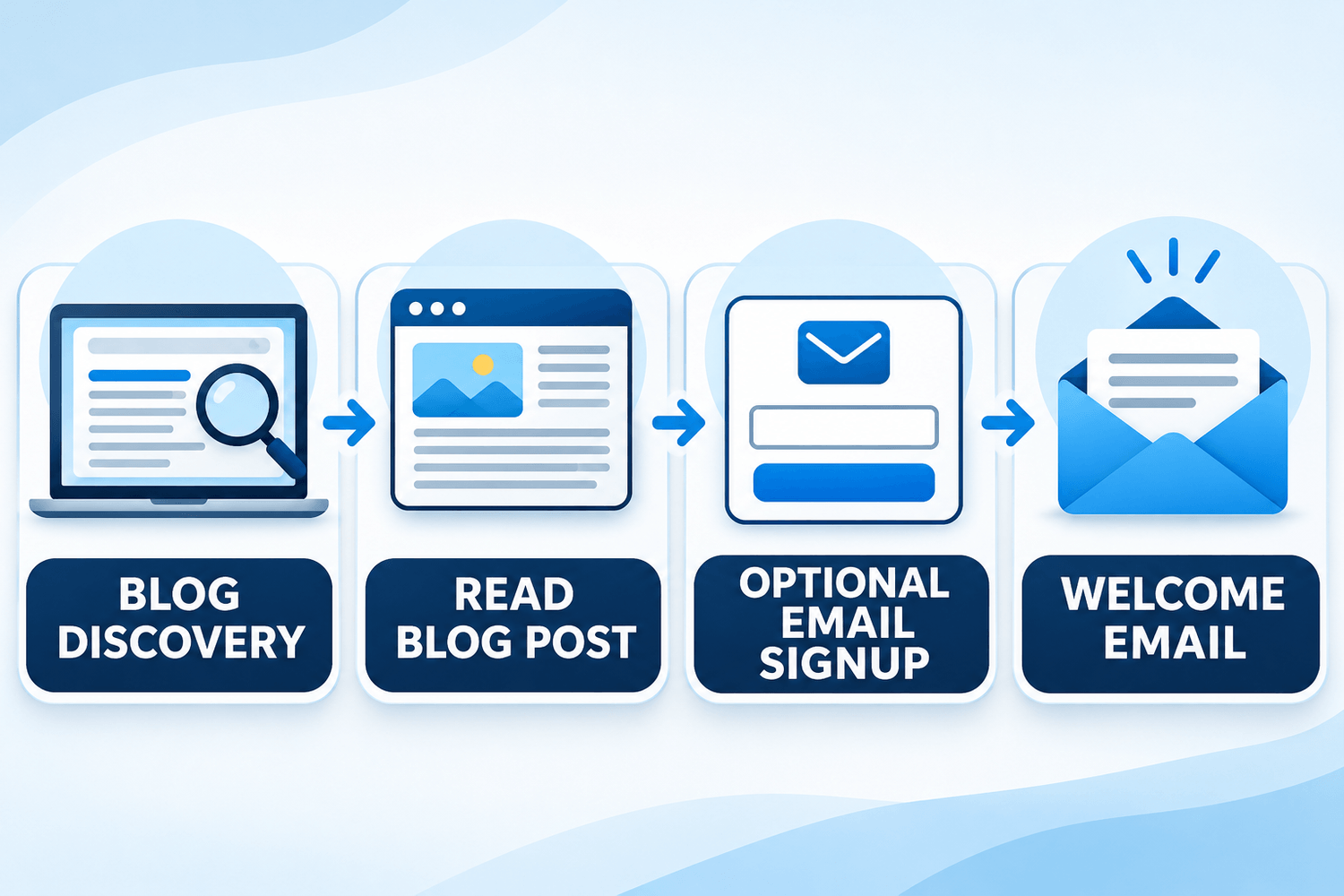
A typical subscriber journey involves several separate actions.
- Someone discovers a blog post through a search engine, another website, or a shared link.
- They read information that addresses their question.
- They notice an invitation to receive a related free resource.
- They decide whether to provide their email address.
- They complete the signup process and receive the promised resource.
Depending on the email platform and confirmation settings, submitting a form may not immediately make someone a confirmed subscriber.
Each stage offers an opportunity to improve the experience, but none guarantees the next.
Your goal is to make the process clear, useful, and trustworthy rather than pressure every visitor into subscribing.
Create a Free Offer That Gives Readers a Reason to Subscribe
A free offer, often called a lead magnet, gives readers something valuable in exchange for joining your email list.
It doesn't have to be a lengthy ebook or an expensive course.
For beginners, a short resource that solves one specific problem can be easier to create and more immediately useful.
Identify What Your Blog Readers Actually Need
Start with the question your article is answering.
If you're writing about beginner affiliate marketing, your readers might struggle with choosing a niche, finding traffic sources, or understanding their first steps.
A free resource should help with one of those problems.
You can discover potential needs by examining questions readers ask, reviewing relevant search queries, or identifying steps that require more explanation than your article provides.
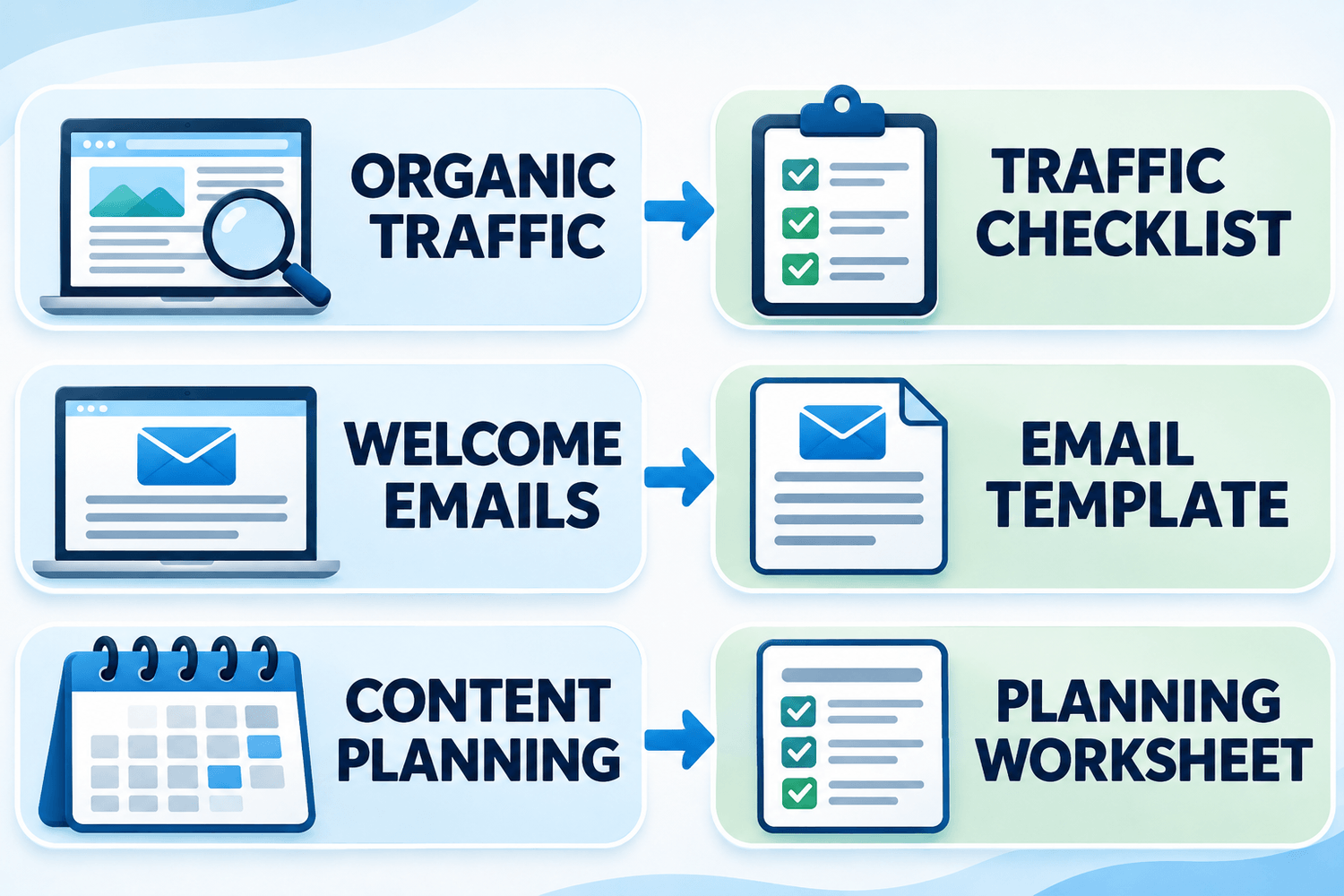
For example, readers learning about organic traffic might appreciate a simple worksheet for planning their first five blog posts.
The important question is not, "What can I give away?"
It's, "What would help this reader make progress after finishing the article?"
Choose a Simple Lead Magnet You Can Deliver
Several beginner-friendly formats work well for educational blogs.
- Checklists: Help readers complete a process without forgetting important steps.
- Short reports: Explain a focused subject in greater detail.
- Templates: Give readers a starting structure they can adapt.
- Worksheets: Help readers organize information or make decisions.
- Quick-start guides: Walk readers through a manageable first project.
Choose a format that fits the problem rather than assuming one type will always produce more subscribers.
For example, a checklist may suit a process with several steps, while a template may be more useful when readers need something they can immediately customize.
Whatever you create, make sure it delivers what the signup invitation promises.
Match Your Free Offer to the Blog Post Topic
A common mistake is displaying the same generic signup message on every article, regardless of its subject.
Imagine publishing a post titled "How to Get Free Traffic for Affiliate Marketing."
A relevant offer could be a free checklist showing readers how to plan their first organic traffic strategy.
Now imagine a different post about writing welcome emails.
Those readers may prefer a simple welcome email template.
Both resources support email list building, but they serve different immediate needs.
You don't necessarily need a unique lead magnet for every article. One useful resource can support several closely related posts.
Start with one strong offer, then consider additional resources when you identify distinct reader needs.
Set Up an Email Signup System for Your Blog
Once you have an offer, you need a reliable way for readers to request it.
A basic signup system includes an email marketing service, a form or landing page, and a process for delivering your resource.
You can begin with a relatively simple setup.
Choose an Email Marketing Platform
An email marketing platform helps you collect subscriber information, organize your list, and send messages.
Before choosing one, check whether it supports the functions you need:
- Signup forms or integrations with your website.
- Subscriber consent and unsubscribe management.
- Automated welcome emails.
- Delivery of links to downloadable resources.
- Basic reporting on subscriptions and email activity.
Some services provide additional features such as landing pages, segmentation, and automation workflows.
You don't need every advanced feature immediately.
Choose a system that you can understand and maintain, and verify its current features, pricing, and limitations before committing.
Create a Simple Signup Form or Landing Page
Your signup form should make the offer easy to understand.
A basic form might contain a headline, a short explanation of the free resource, an email address field, and a clear signup button.
For example:
Free Organic Traffic Checklist
Get a simple checklist to help plan your first organic traffic strategy.
Button: Send Me the Checklist
Also explain what readers are signing up to receive, including any ongoing marketing emails. Provide appropriate privacy information and obtain the consent required for your audience and jurisdiction.
Avoid requesting unnecessary personal information.
A dedicated landing page can provide more room to explain the offer, but a well-placed form inside a blog post may be sufficient for a simple setup.
Deliver Your Free Offer With a Welcome Email
After someone subscribes, deliver what you promised.
An automated welcome email can thank the subscriber, explain what to expect, and provide a link to the free resource.
Keep the message straightforward.
For example, if someone requested a blogging checklist, the email should make that checklist easy to access rather than immediately directing them toward unrelated promotions.
Test the complete process yourself, including the form submission, any required confirmation, the delivery email, and the resource link.
A smooth first experience helps establish trust.
Place Email Signup Opportunities Inside Your Blog Posts
Having a signup form somewhere on your website isn't enough if interested readers never notice it.
Placement matters, but relevance and usability matter just as much.
The objective is to make subscribing convenient without interrupting the article's educational purpose.
Add a Relevant Signup Invitation Near Helpful Content
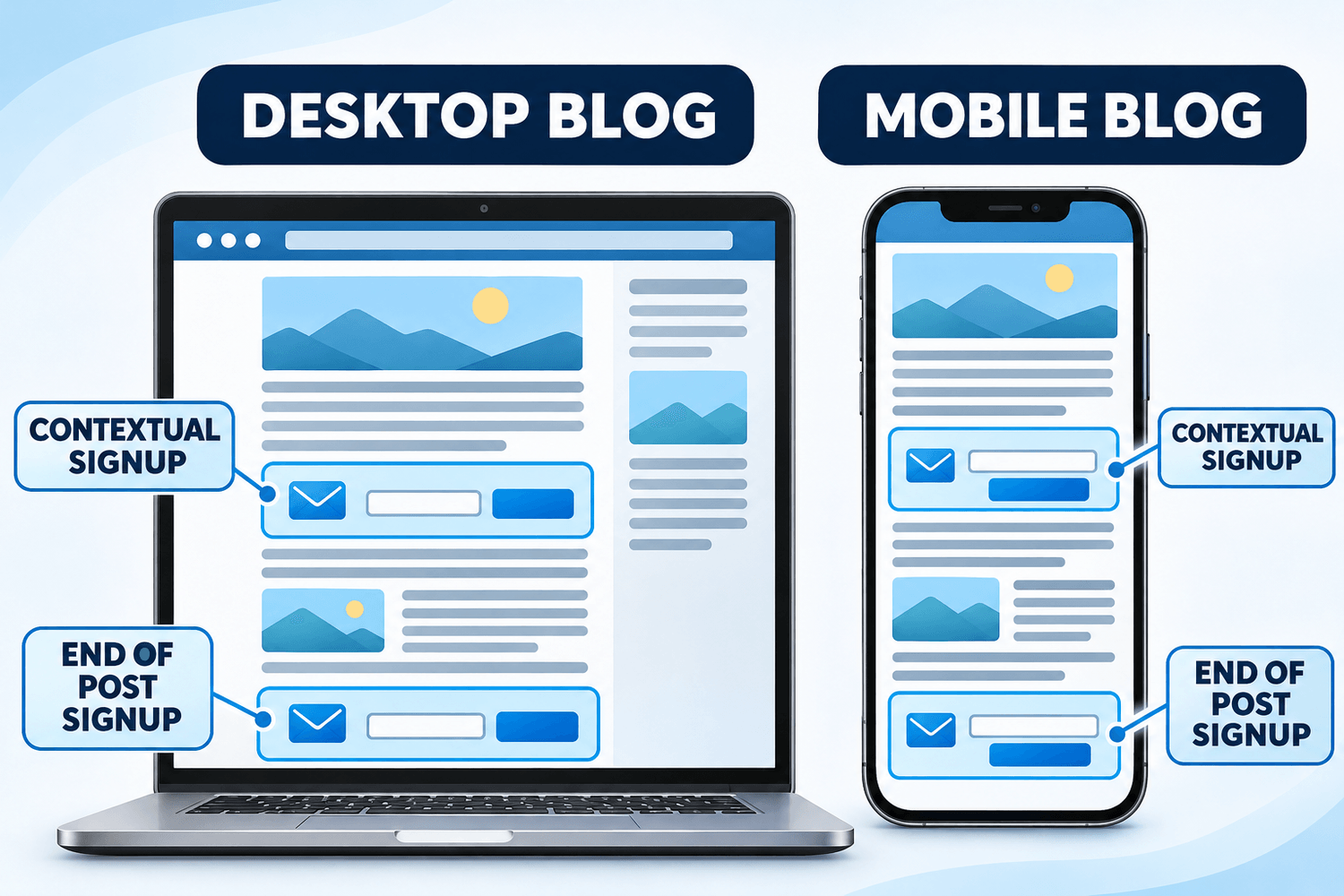
One useful approach is to place a signup invitation near a section where the free resource would help readers take action.
For example, an article explaining keyword research could introduce a keyword planning worksheet after describing how to evaluate potential topics.
That placement gives readers a clear reason to consider the offer.
Keep the message brief and specific.
Instead of a generic invitation such as "Join My Newsletter," explain what the reader will receive and why it relates to the article.
Don't place a form after every few paragraphs. Excessive interruptions can make content harder to read.
Use a Clear Call to Action at the End of Your Post
Some readers prefer to finish an article before deciding whether they want additional information.
An end-of-post signup invitation gives them that opportunity.
A useful message might say:
"Want a simple way to organize your next five blog posts? Get the free content planning worksheet and start mapping out your ideas."
The message connects the offer to a specific next step.
Keep the action understandable, and avoid vague promises or exaggerated benefits.
This type of signup invitation is part of the email list-building strategy discussed in the article. It is separate from any promotional CTA you may choose to place after the finished article.
Make Your Signup Forms Easy to Use on Mobile Devices
A form that looks attractive on a desktop computer may be difficult to use on a phone.
Check that text is readable, fields are easy to select, and the signup button is clearly visible.
Avoid layouts that require horizontal scrolling or make readers struggle to close an overlay.
Also test what happens after someone submits the form.
Does the confirmation message appear correctly? Does the welcome email arrive? Can the subscriber open the free resource on a mobile device?
A simple, accessible experience is more valuable than decorative features that interfere with signup.
Attract More Relevant Readers Without Paid Advertising
Once your signup system is working, the next challenge is bringing interested people to your blog posts.
Organic traffic can come from search engines, links on other websites, and people sharing useful content.
Unlike paid advertising, organic discovery doesn't require paying for each visitor. However, it still requires time, effort, and ongoing improvements.
Target Search Questions Your Audience Is Already Asking
Begin with specific questions your intended readers want answered.
For example, instead of writing a broad article about online marketing, you might focus on how beginners can build an email list without a website or how affiliate marketers can attract visitors without buying ads.
Specific questions help you define the reader's problem and create focused content.
You can use search suggestions, related questions, and available keyword research to identify potential topics.
Then consider whether you can provide a genuinely useful answer.
A keyword isn't automatically worth targeting because it appears in a research tool. It should also fit your audience and the subjects your website covers.
Write Helpful Content That Supports Your Free Offer
Your blog posts should deliver meaningful value even when someone chooses not to subscribe.
Answer the main question clearly, explain necessary steps, and provide examples readers can adapt.
A signup offer should extend that value rather than withhold information the article promised to deliver.
For instance, an article could explain how to create a basic content plan, while a downloadable worksheet helps readers organize their own plan.
This approach is consistent with Google's guidance on helpful, people-first content, which emphasizes creating material that benefits readers rather than content designed primarily to manipulate search rankings.
Helpful content doesn't guarantee search visibility, but it gives your visitors a better reason to engage with your website.
Connect Related Blog Posts With Internal Links
Internal links help readers move between relevant articles on your website.
If someone reads a post about free affiliate marketing traffic, a link to a related guide about building an email list may help them continue learning.
Use descriptive link text that explains the destination.
Avoid linking to unrelated pages simply to increase the number of links in an article.
You can also connect several closely related posts to one relevant lead magnet, provided the offer makes sense for each audience.
This creates a more coherent learning experience without requiring a separate signup incentive for every post.
Improve Your Blog's Email Signup Results
After your blog starts receiving visitors and collecting subscriptions, you can evaluate what's working.
You don't need complicated analytics to begin. A few basic measurements can help you make more informed decisions.
Track Blog Visits and Email Signups Separately
Website traffic and email subscriptions measure different activities.
A visitor may read several pages without subscribing. Another may subscribe during their first visit.
To understand the relationship, compare the number of email signups with the number of relevant visits over the same period.
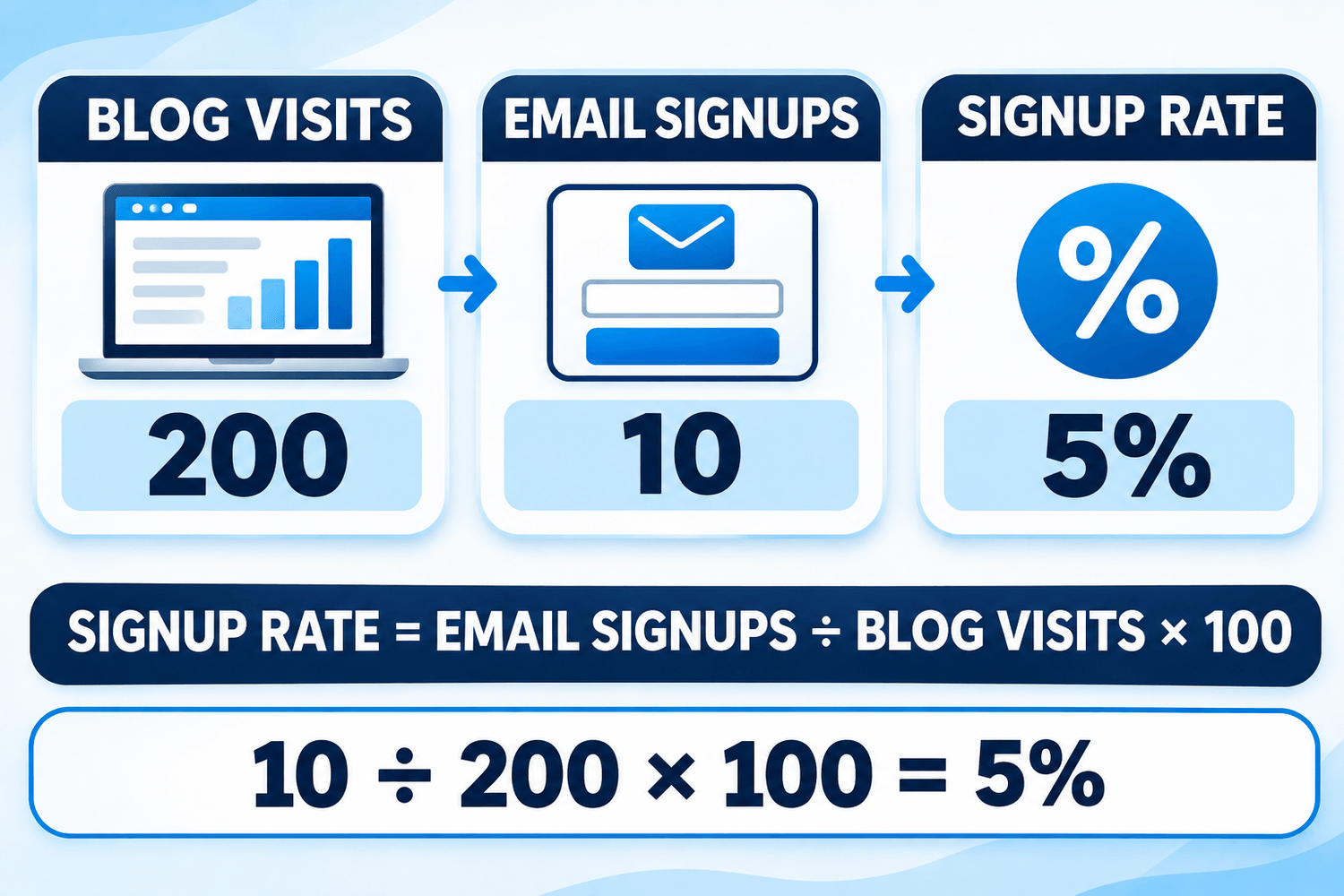
The basic calculation is:
Signup Rate = (Email Signups ÷ Relevant Visits) × 100
For example, suppose a particular landing page receives 200 visits during a month and records 10 signups attributed to those visits.
Its illustrative signup rate would be 5%.
That example is a calculation, not an industry benchmark or prediction of what your blog should achieve.
Be consistent about what you're measuring. Sessions, unique visitors, form submissions, and confirmed subscribers are not interchangeable.
Also remember that different analytics systems may count activity differently.
Test Your Signup Message and Offer
If readers are visiting but not subscribing, examine the invitation itself.
Does the headline clearly explain what they'll receive?
Does the free resource match the article?
Is the form easy to complete?
Start by changing one meaningful element, such as the headline or the explanation of the offer.
Observe the results before making another change.
With limited traffic, small differences may reflect ordinary variation rather than a reliable improvement. Avoid drawing strong conclusions from just a few visits or signups.
Testing is useful because it helps you learn about your audience, not because every change will increase conversions.
Fix Common Reasons Readers Do Not Subscribe
Several issues may contribute to disappointing signup results.
The offer doesn't match the reader's interests. A visitor looking for SEO advice may not want an unrelated general business report.
The benefits aren't clear. Readers should understand what they'll receive before submitting their information.
The form asks for too much information. Unnecessary fields can make the process feel inconvenient.
The signup experience doesn't work properly. Broken forms, inaccessible download links, and missing delivery emails can prevent successful subscriptions.
The blog has very little relevant traffic. Even a useful offer has limited opportunities to attract subscribers when few interested people see it.
Don't assume the signup form is the problem before checking the complete process.
Sometimes improving content relevance or fixing a technical issue is more useful than redesigning a button.
Build a Simple Email Subscriber Growth Routine
You don't need to launch a complicated marketing system to start building your list.
A manageable routine allows you to publish useful content, collect feedback, and improve gradually.
Start With One Helpful Blog Post and One Relevant Offer
Begin with a topic that directly addresses a problem your intended audience faces.
Write a helpful article, create a related free resource, and connect it to a working signup form.
Before publishing, check the entire experience from the reader's perspective.
A practical starting routine is:
- Choose one relevant question to answer.
- Create an article that addresses it thoroughly.
- Prepare a useful resource that supports the article.
- Add a clear signup invitation.
- Test the form and resource delivery.
- Publish and make the article discoverable through appropriate organic channels.
You can expand the system as you learn what readers find useful.
Review Your Results and Improve What Is Not Working
Set aside time periodically to review the information you have.
Look at which posts attract visitors, which offers receive signups, and whether subscribers receive the resources they requested.
If an article attracts visitors but few subscribers, consider whether its offer is relevant.
If a form receives submissions but subscribers don't receive the promised resource, investigate the delivery process.
If an article receives little traffic, review its topic, usefulness, discoverability, and connections to related content.
Focus on improvements supported by your observations.
Building an email list through blogging is an ongoing process. Consistent learning and useful content matter more than chasing a particular subscriber number.
Frequently Asked Questions
Can You Get Email Subscribers From a Blog With Very Little Traffic?
Yes. A small blog can begin collecting subscribers if its visitors are interested in the content and the signup offer.
However, limited traffic also limits the number of opportunities to gain subscribers. Focus on relevance, a working signup process, and gradually improving content discovery rather than expecting rapid growth.
Do You Need a Free Lead Magnet to Get Blog Subscribers?
No. Readers may subscribe to receive useful newsletters, new articles, or ongoing educational updates.
A lead magnet provides a specific additional incentive, but it isn't mandatory. Choose an approach that fits your audience and that you can deliver consistently.
How Many Email Signup Forms Should a Blog Post Have?
There isn't one ideal number for every article.
A contextual invitation and an end-of-post signup opportunity may be sufficient. Longer articles may justify another placement if it genuinely helps readers.
Prioritize relevance and usability over adding more forms.
Can You Build an Email List Without Paying for Advertising?
Yes. You can attract readers through organic search, relevant referrals, and useful content shared through appropriate channels.
You may still have expenses for hosting, software, or other services. And organic growth requires work and patience.
Not paying for advertising doesn't mean the entire process is automatically free.
What Should You Send Someone After They Subscribe?
Start by delivering whatever you promised during signup.
If the reader requested a checklist, provide an accessible link to that checklist.
You can also briefly introduce your email content and explain what subscribers can expect next.
For ongoing marketing messages, provide clear sender information and a functioning unsubscribe method. The FTC's CAN-SPAM compliance guide explains important U.S. requirements for commercial email.
Products / Tools / Resources
You can build a basic blog email signup system with a small selection of tools. Choose based on your actual needs rather than trying to use everything available.
- Email Marketing Platform: A service for collecting subscribers, managing lists, and sending welcome emails. Check current features and subscription terms before selecting one.
- Signup Form or Landing Page Builder: A way to present your offer and collect email addresses. Your blogging platform may already provide compatible options.
- Document Creation Tool: A simple editor or design application can help you create downloadable checklists, reports, templates, and worksheets.
- Website Analytics: Use available analytics to understand visits and evaluate whether your signup process is working.
- Google Search Console: A free Google tool for monitoring aspects of your website's performance in Google Search. It helps you understand search visibility, but it does not replace email signup tracking.
- Email Marketing Compliance Resources: Consult your email provider's documentation and applicable privacy and marketing rules to understand consent, identification, and unsubscribe requirements.
Choose one reliable system, make sure it works for your readers, and add complexity only when there's a clear reason to do so.
Want to Learn More About Building an Online Business?
If you're exploring beginner-friendly ways to generate leads and build an online business, my free report shares an approach you can learn more about.

WRITTEN BY
Tom Kimpton
Founder, Marketing With Tom
Tom Kimpton is the founder of Marketing With Tom, where he shares practical strategies for affiliate marketing, traffic generation, email list building, and making money online. He focuses on testing tools and strategies firsthand and sharing what he learns to help beginners build their online business.
READY FOR THE NEXT STEP?
Build Your Traffic and Email List With the Tools I Use
I’ve put together the resources I use and recommend for generating
traffic, building an email list, and growing an online business.
If you’re looking for a simple place to start, this is it.

Practical strategies for building traffic, growing an email list, and creating an online marketing business.
Start Here
New to online marketing?
Start with practical guides for generating traffic, building your email list, and creating a simple marketing system.
© 2026 Marketing With Tom. All rights reserved.