Use Internal Links and Descriptive Supporting Elements
Internal links help readers discover related information without searching your entire website.
For example, an article about writing blog posts could link to a relevant tutorial about keyword research when the reader needs more detailed guidance.
Use anchor text that explains what the linked page covers rather than relying on phrases such as "click here."
Supporting elements can also improve understanding.
A short table may clarify a comparison. A checklist may make a process easier to follow. An illustration may help explain something difficult to describe.
When using images, provide meaningful alternative text where appropriate so readers using assistive technology can understand relevant visual information.
The objective is clarity, not decoration.
5. Write Helpful Content That Deserves a Reader's Attention
An organized article still needs substance.
Readers should leave with information they can understand and apply.
Answer the Main Question Clearly and Early
One common writing mistake is delaying the answer.
If someone searches for instructions on choosing an affiliate niche, they shouldn't have to read several paragraphs about the history of affiliate marketing before receiving useful guidance.
Explain the main idea early, then expand with examples and necessary details.
Google's people-first content guidance encourages content that offers substantial value and helps visitors accomplish their goals.
That doesn't mean every article must be long.
It means the content should provide enough useful information for the question being answered.
Add Practical Examples and Original Value
Generic advice often leaves readers wondering what to do next.
Consider this example.
Before:
"Write quality content and optimize it for SEO."
That sounds reasonable, but it doesn't explain an action.
After:
"Before drafting your next blog post, write down the question your reader wants answered. Build your main headings around the steps needed to answer it, then add a practical example wherever the instructions might be confusing."
The second version gives the reader something specific to try.
Original value doesn't always require exclusive data or a groundbreaking discovery.
It can come from clearer explanations, carefully developed examples, useful comparisons, or a decision-making framework that makes a difficult task easier.
What matters is whether your contribution helps the reader.
Use Keywords Naturally Without Repeating Them Excessively
Keywords help establish the subject of an article, but repeating the same phrase constantly can make writing awkward.
Suppose your primary keyword is "how to write blog posts that attract organic traffic."
You might naturally use related language such as:
- Writing helpful blog content
- Improving search visibility
- Choosing relevant topics
- Understanding search intent
- Optimizing existing articles
These expressions support the topic without forcing the exact phrase into every paragraph.
Write for clarity first. Review keyword usage afterward.
Avoid arbitrary keyword-density targets. Google does not require a particular number of repetitions to understand an article.
6. Publish Your Blog Posts Without Overlooking Basic SEO
Before publishing, review a few important details that are easy to miss.
Review Your Title, URL, and Meta Description
Start with the page title.
It should accurately describe the content and distinguish the article from other pages on your website.
Next, review the URL.
A short, descriptive address is usually easier for readers to understand than one containing unrelated words or unnecessary characters.
Your meta description should briefly explain what the article covers.
Google may use that description when generating a search snippet, but it can also select text from the page. A meta description isn't a guarantee of a particular search appearance or ranking.
You can learn more in Google's SEO Starter Guide.
Check Internal Links and Mobile Readability
Read your article on a smaller screen before publishing.
Look for paragraphs that feel too dense, tables that are difficult to navigate, and formatting that makes the content uncomfortable to read.
Check that your links work and lead to relevant destinations.
Make sure important related articles can be reached through normal website navigation or contextual internal links.
A simple publishing review might include:
- Clear page title and URL
- Useful meta description
- Logical headings
- Readable mobile layout
- Relevant, working internal links
- Appropriate image descriptions
- No obvious factual or spelling errors
These checks won't guarantee traffic, but they can prevent avoidable usability and publishing problems.
Make Sure Your Post Can Be Indexed
After publishing, confirm that the page is accessible and eligible for indexing.
Google Search Console's URL Inspection tool can help you investigate whether Google has indexed a particular URL and identify certain indexing-related issues.
You can also maintain an XML sitemap to help search engines discover important URLs.
However, submitting a sitemap or requesting indexing doesn't guarantee that Google will index a page or display it prominently.
If a post isn't indexed, investigate the reason before rewriting its content.
Sometimes the next useful action is technical rather than editorial.
7. Improve Existing Blog Posts Using Real Search Data
Publishing doesn't have to be the final step.
Reviewing what happens afterward can help you make more informed decisions about your next article or revision.
Check Impressions and Clicks in Google Search Console
Google Search Console provides information about how your website appears in Google Search.
Three useful metrics are:
Impressions: How often a link to your website appears in search results, according to Google's reporting rules.
Clicks: How often someone clicks your website's result.
Click-through rate (CTR): The percentage of impressions that result in clicks.
You can review these metrics for individual pages and relevant queries.
For example, imagine a hypothetical blog post that receives 800 impressions and 8 clicks during a reporting period.
Its CTR would be 1%.
That number alone doesn't establish a problem. Search position, query intent, result presentation, and other circumstances affect how people interact with results.
Use the data as a starting point for investigation rather than an automatic judgment about article quality.
Google explains these measurements in its Search Console Performance Report documentation.
Identify Posts That Need Better Answers or Clearer Titles
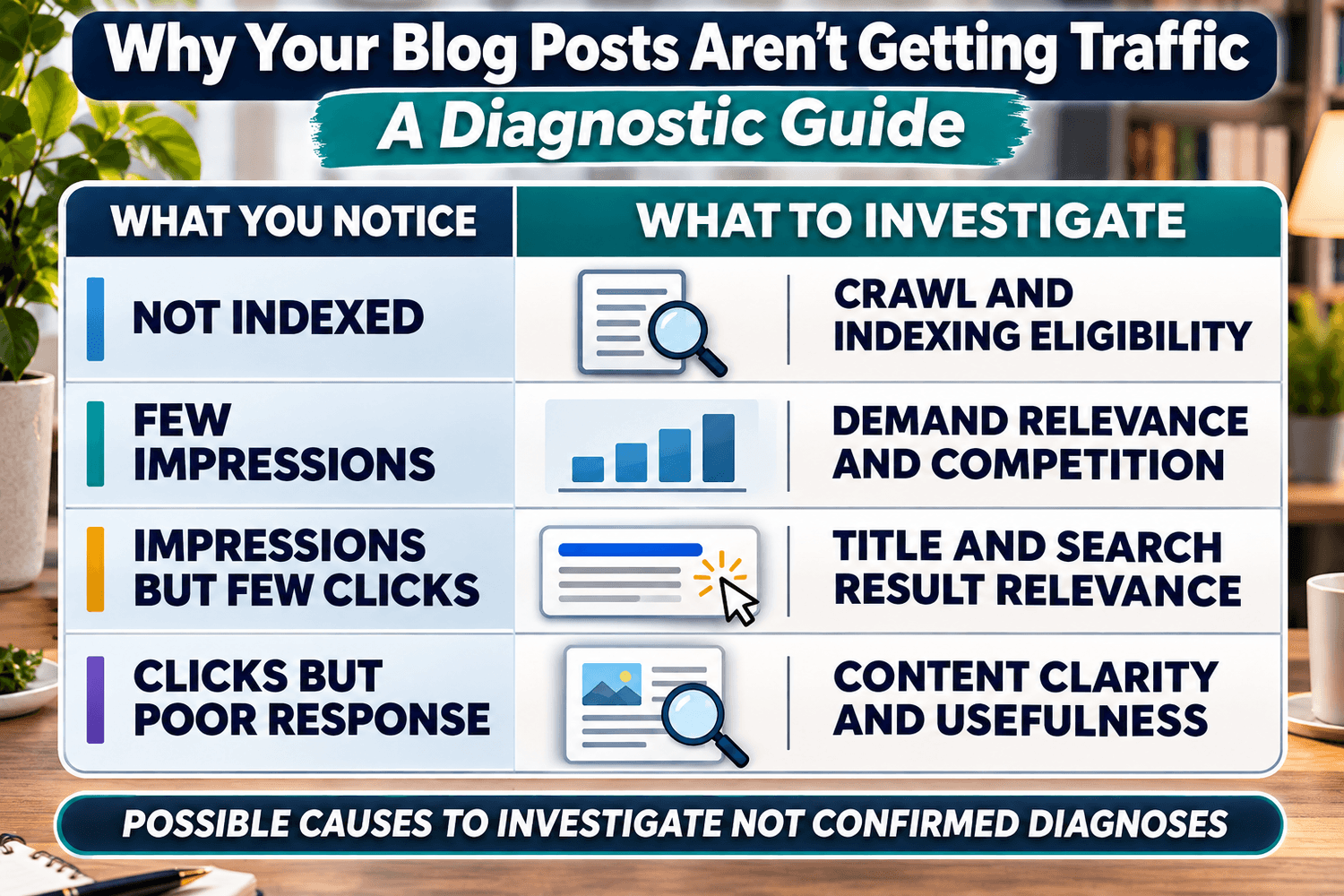
Different performance patterns suggest different questions to investigate.
These are possible explanations, not guaranteed diagnoses.
For instance, a page receiving impressions but few clicks may appear for queries where the reader wants something different from what your article offers.
Changing the title might help communicate its relevance, but it won't necessarily solve the underlying mismatch.
Review the actual queries and page content before making changes.